

Description
Download WebKOBIS ERP – ERP, CRM, Production, B2B, SaaS, Cloud
Overview
WebKOBIS ERP is a cloud-based enterprise resource planning (ERP) solution designed to support businesses of varying sizes, with a particular focus on production processes. As a Software-as-a-Service (SaaS) platform, it offers modular functionality across trade, customer relationship management (CRM), and full ERP operations. The system is structured to address common business challenges such as fragmented data, inefficient workflows, and lack of integration across departments. It enables centralized control of key operations including procurement, sales, production, quality assurance, and financial management.
Target users include small to large enterprises seeking scalable, cost-effective digital transformation tools. The software is especially suited for manufacturing, distribution, and service-oriented businesses that require detailed tracking of production activities and operational workflows. Its web-based architecture ensures access from any device with an internet connection, supporting remote teams and field personnel. The developer, WebKOBIS, positions the platform as a flexible alternative to traditional on-premise ERP systems, emphasizing ease of use and adaptability.
Real-world usage scenarios include managing multi-stage production cycles, tracking customer and vendor interactions, generating dynamic reports for decision-making, and maintaining compliance through documented quality processes. The system also supports B2B integration, allowing customers and suppliers to access specific portals for order tracking, data sharing, and service requests. While specific performance benchmarks were not provided, the platform’s modular design suggests it can be tailored to meet evolving business needs without requiring major overhauls.
Key Features & Capabilities
- Modular ERP Structure: WebKOBIS offers three core editions—TRADE, CRM, and ERP—each expandable through optional modules. This allows businesses to start with essential functions and scale up as needed, reducing initial investment and complexity.
- Production and Quality Management: The system includes advanced production tracking, BOM (Bill of Materials) management, activity-based production, and process-based quality assurance. These features support detailed oversight of manufacturing workflows, from design and sampling to final delivery.
- Integrated Business Modules: Over 35 main modules cover areas such as sales, procurement, inventory, finance, HR, and document management. Each module is designed to interoperate seamlessly, ensuring data consistency and eliminating silos across departments.
- Customizable Dashboards and Reporting: Users can create personalized dashboards using over 50 standard templates and more than 400 analysis charts. Dynamic filtering and export options (CSV, PDF, Excel) enable real-time data visualization and reporting for strategic planning.
- B2B and Mobile Access: Optional B2B modules provide secure portals for customers and vendors, enabling online order tracking and service requests. A mobile access portal supports field personnel with real-time data access and task updates.
- Role-Based Security and Access Control: The platform supports granular user permissions based on roles and groups. Administrators can define access rules by user, IP address, and login time, enhancing data security and compliance.
- Flexible Licensing and Data Ownership: WebKOBIS operates on an annual subscription model without long-term contracts. Users retain full ownership of their data and can download their database at any time, ensuring transparency and control.
User Interface, Workflow & Performance
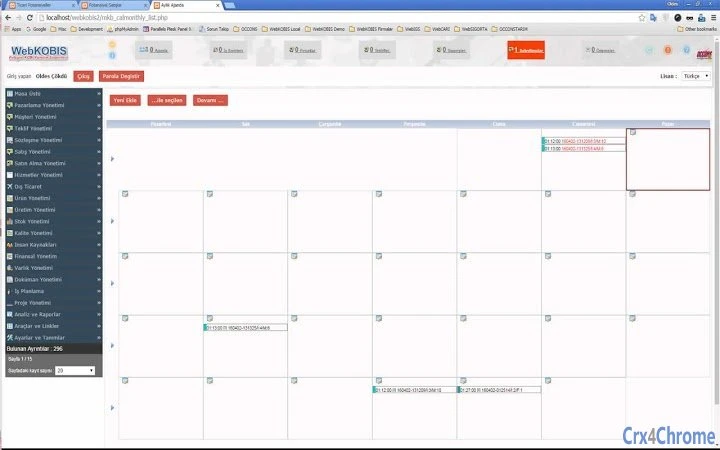
WebKOBIS features a Windows-like, role-based menu system designed for intuitive navigation. The interface is structured around dynamic forms and list views, supporting quick data links, advanced filtering, and search capabilities across more than 525 forms. This design aims to streamline user workflows by minimizing clicks and enabling rapid access to relevant information.
Navigation is supported through customizable dashboards and notification widgets, allowing users to monitor key performance indicators and pending tasks. The system’s emphasis on dynamic filtering and real-time data updates enhances workflow efficiency, particularly in departments requiring constant monitoring of sales, production, or procurement activities.
Performance details were not specified by the developer. However, as a cloud-based SaaS solution, WebKOBIS relies on remote servers, which typically ensures consistent availability and scalability. The developer did not provide specific information on CPU or RAM usage, but the web-based nature of the software suggests minimal local resource demands. Stability is expected to be maintained through regular updates and automated backups, though real-world user experiences were not included in the provided data.
Compatibility & System Requirements
WebKOBIS is accessible via any modern web browser on Windows, Mac, and Linux operating systems. This cross-platform compatibility ensures broad accessibility for teams using diverse devices. The software does not require installation on local machines, as it operates entirely through a web interface.
The application size is listed as 25 MB, which refers to the deployment footprint on the server side rather than a local download. No specific hardware requirements were provided, but the web-based nature implies that client devices only need a stable internet connection and a supported browser to function effectively.
Exact system requirements were not listed. The developer did not specify minimum processor speed, RAM, or storage needs for optimal performance. Compatibility information is limited to the supported operating systems, with no mention of older or specialized environments.
Pros and Cons
Pros
- Cloud-based SaaS model with no upfront hardware costs
- Scalable from TRADE to ERP with easy edition upgrades
- Over 35 core modules and 75+ integrated management functions
- Customizable dashboards and dynamic reporting tools
- Role-based security and IP/user access restrictions
- Supports B2B portals and mobile access for field teams
- Data ownership and export options available at any time
- Annual subscription with no long-term contracts
Cons
- Price details not publicly available; cost depends on modules and users
- No specific performance metrics or benchmark data provided
- Exact system requirements were not listed
- Dependent on stable internet connection for full functionality
- Learning curve may exist for users unfamiliar with ERP systems
- Limited information on customer support channels
FAQ Section
Is WebKOBIS compatible with Windows, Mac, and Linux?
Yes, WebKOBIS is accessible via any modern web browser on Windows, Mac, and Linux systems. No local installation is required.
Is WebKOBIS a secure cloud-based ERP system?
WebKOBIS uses encrypted communication and multiple security mechanisms, including IP and user access controls, login time restrictions, and integrated firewall features to protect data.
Can I upgrade from the TRADE edition to the ERP edition?
Yes, the platform allows seamless scaling from TRADE to CRM or from CRM to ERP editions based on business needs.
Do I retain ownership of my data if I stop using WebKOBIS?
Yes, your data remains yours. You can download your entire database at any time, including during or after subscription.
Is WebKOBIS available for offline use?
WebKOBIS is a cloud-based system and requires an internet connection for full functionality. Offline access is not supported.
Final Thoughts + CTA
WebKOBIS ERP presents a comprehensive, scalable, and flexible solution for businesses seeking to digitize and integrate their operations. Its modular architecture, cloud-based delivery, and emphasis on production and B2B integration make it a strong contender for small to large enterprises in manufacturing, distribution, and service sectors. The ability to customize dashboards, manage workflows across departments, and scale functionality as needed adds significant value.
While pricing details are not publicly available and performance data is limited, the platform’s focus on user control, data ownership, and annual licensing without long-term commitments enhances its appeal. For businesses looking for a modern, web-based ERP system with strong production and CRM capabilities, WebKOBIS offers a compelling foundation.
Download WebKOBIS ERP now
Guides & Tutorials for WebKOBIS ERP3 App for Chrome
How to install WebKOBIS ERP3 App for Chrome
- Click the Preview / Download button above.
- Once redirected, accept the terms and click Install.
- Wait for the WebKOBIS ERP3 App for Chrome download to finish on your device.
How to use WebKOBIS ERP3 App for Chrome
This software is primarily used for its core features described above. Open the app after installation to explore its capabilities.
User Reviews for WebKOBIS ERP3 App for Chrome 0
No reviews found





